Learn
Working with more than one agent at once
Two or three sessions in parallel can be faster, if the tasks are independent and you can still read every diff. Here is the setup that makes it work, and the point where it stops paying.
Short answer
Running two or three agents at once pays off only when the tasks are independent and each one can be checked on its own. When they overlap, what you have multiplied is the review you owe, plus the work of fitting the pieces together. The bottleneck moves from how fast code gets written to how fast you can read it.
What has to be true before you split a task off
Not every list of three tasks is three parallel tasks. Before one goes to its own session, it should pass all three.
Independent It touches code the other tasks do not. Two features in separate modules qualify. A refactor and a feature that both edit the same service do not.
Verifiable on its own You can tell whether it worked without the other branches landing first: a test run, a page you can open, output you can read. If checking one needs another finished, they are one task in sequence, not two.
Small enough that you will read it Leave yourself time to read the code. If two waiting branches make you rush through the first, take on fewer tasks at once.
Give each agent its own worktree
A git worktree is a second working directory for the same repository, checked out to a different branch and sharing one history. Each session edits its own files and never sees another’s half-finished work. Every session still runs with your own access.
Two sessions in one directory means two processes editing the same files on one branch, and a branch switch under a running session produces a diff nobody can explain.
Start a task in its own worktree
One branch and one sibling directory per task, named after it. Install dependencies there if the project needs them.
git worktree add -b fix-search ../app-fix-search HEAD
cd ../app-fix-search
claude
After the branch merges, check git status for anything uncommitted before you remove the worktree.
Keeping sessions alive and switchable
Three agents means three long-running sessions you move between. A terminal multiplexer such as tmux keeps them available when you detach or an SSH connection drops, with one window per worktree named after the task. It cannot keep a laptop awake: local sessions pause when the lid closes, so work that should carry on belongs on a machine that stays on.
For running them on another machine, see Running Claude Code on a remote machine.
Letting sessions talk to each other
Sometimes two tasks are almost independent and the overlap is a single interface: a function signature, a response shape, a database column. One agent decides what it looks like and the other has to learn that decision.
So pass the decision on. If your setup lets sessions message each other, the one that settled it tells the other directly; otherwise write it where both read, such as a note in the repository or a tracker comment. The second session then hears about the change before a merge conflict tells it. Better still, settle the interface yourself first.
Issues as the shared queue
The state of a multi session job belongs outside your head, and an issue tracker is built for that. Write each task as an issue detailed enough for an agent to pick up cold: what to change, where, and how to tell it worked.
The queue then tells you what is done, what is in flight and what nobody has started. For agents to read and update issues themselves, the tracker’s command line tool has to be installed and permitted in the session, which for GitHub is gh. Connecting Claude Code to the tools you already use covers that.
For a local alternative, Backlog.md keeps tasks as Markdown files and gives you a Kanban board in your browser. You move cards on the board; Claude reads and updates tasks through the CLI. It is a simple option when you want the queue alongside your code.
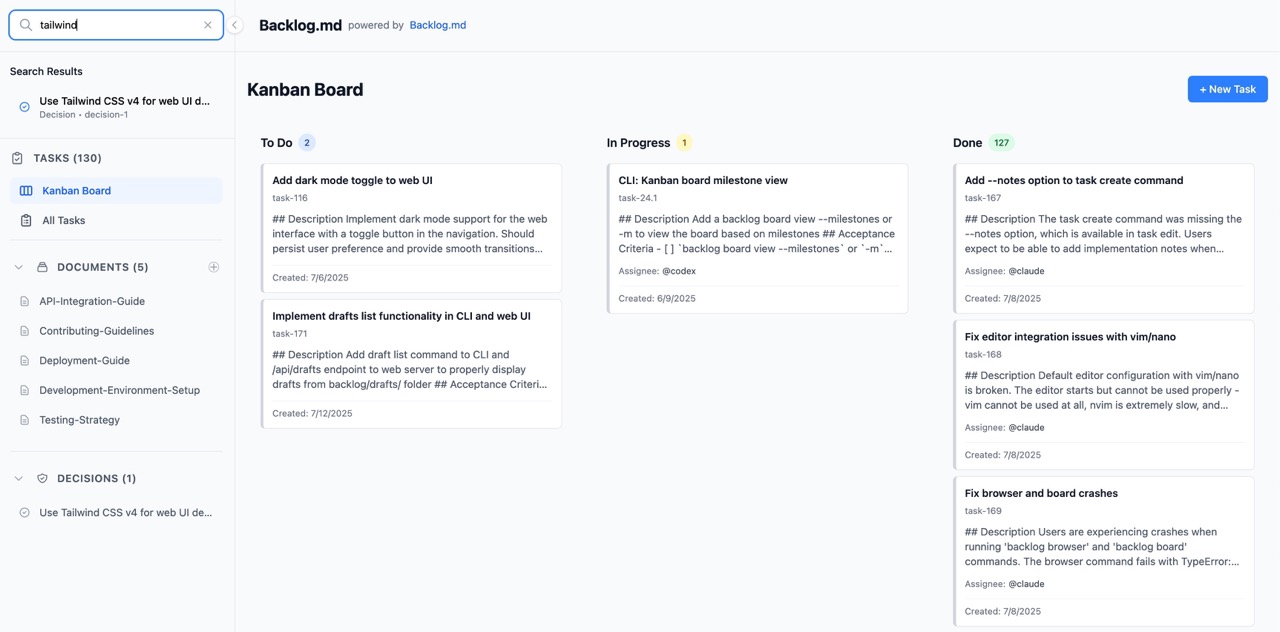
With separate worktrees, have every session read and update the same task source. Separate branch copies of the task files do not form a live shared queue.
Check each branch on its own
Parallel work stays parallel only if you can verify it in parallel. Three branches queuing behind one staging environment turn the slow half of the process back into a line. Each branch needs its own environment and its own data, and the combined result still needs a check after merging.
On AppHaven every pushed branch gets a preview with its own database, so two pieces of work in progress can be checked separately rather than one after another, as described in From Claude Code to production.
What goes wrong
Two agents editing the same interface from opposite ends is the classic failure. Both branches pass their own tests, and the merge produces a version of the code neither session ever ran. You find out at integration time.
The review backlog is the quieter problem: branches sitting unmerged, then the habit of approving a diff you skimmed. If you are merging on the strength of a summary and a green test run, drop back to fewer sessions until you are reading diffs again.
When one agent is the right answer
Most of the time it is. One task, one branch, your attention on the result, and the overhead of worktrees and session management disappears. Parallel sessions earn their keep on a narrow shape of work: several small, well specified pieces, usually unrelated fixes that have piled up.
Work where you are still deciding what you want belongs in one session. A second agent can usefully explore an alternative or review a proposal, but several agents building parts of an unsettled design produce diffs faster than you can decide what you meant.
Common questions
How many agents can I usefully run at once?
Two or three for most people, and the limit is your review capacity rather than your machine. Each running session adds a diff you have to read before it can merge. If branches are sitting unmerged because you have not got to them, you are past the number that helps.
Do the sessions need separate copies of the repository?
They need separate working directories. A git worktree gives each session its own directory and branch while sharing one repository history, which is lighter than a full clone. Two sessions in one directory will overwrite each other’s files and fight over which branch is checked out.
Run it on AppHaven.
Run your business app with a managed database, private access and production backups.